

FSX100 Inverted Microscope
Discontinued Products

This product has been discontinued, check out our current product
The FSX100 all-in-one microscope provides a compact, innovative plug-and-play solution for bright field, phase contrast and fluorescence microscopy. The FSX100 combines the highest quality, state-of-the-art hardware and smart and intuitive user-friendly software that guides the user to brilliant images. The intuitive nature of the software means that the FSX100 is an ideal multi-user microscope. From automated, to motorized, to closed-box, the FSX100 suits a variety of different system configurations.
Not Available in Your Country
Sorry, this page is not
available in your country.
Features
Accessible Microscopy
The FSX100 all-in-one microscope enables users of any experience level to take exceptional images. Users are guided through a baseline “set - select - capture” workflow to achieve exceptional fluorescence images.
Fully-assisted Fluorescence
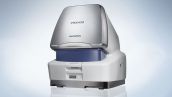
When the FSX100 is turned on, the user is guided to load the sample onto the adaptable stage. Once loaded, an observation mode can be selected. At the touch of a button, an autofocused auto-exposed overview image can be created at low magnification from which 30 regions of interest (ROI) can be defined. On zooming in on one region the users can chose to proceed directly to capturing the image with automatically adjusted since light intensity, exposure time and focus are automatically adjusted by the system. Additionally, users have the option to manually adjust parameters, such as magnification, fluorescence channels and control motorization to optimize image quality without ever needing to physically touch the microscope.
High-quality Imaging for All Users
The Olympus all-in-one microscope concept ensures that users of any level of experience can perform advanced imaging techniques such as time lapse, Z-stacks and multi-area imaging. The speed and ease with which fluorescence images can be created not only makes the FSX100 ideal for beginners, but also offers experienced users unique capabilities. Furthermore, the self-contained portable nature makes the FSX100 particularly useful when bench space is limited or where there is a need to avoid transporting samples.
Optically Superior
All Olympus microscopes are developed around award-winning optics, and the FSX100 is no exception. The FSX100 comes equipped with UIS2 optics poised to match the capabilities of any competitor.
Motorization
The complexity of controlling a microscope using advanced techniques means that there are many components to motorize in order to provide complete automation. The FSX100 is fully motorized to provide precise control over all functions such as focus, objective changes, optical zoom, cover-glass thickness correction, dichroic mirror changes and XY stage positioning.
Optimized Imaging
Fluorescence microscopy is one of the most common imaging techniques and has been instrumental in the discovery of many important scientific breakthroughs. Furthermore, a broader range of scientists are turning to fluorescence microscopy to image at the cellular and subcellular levels. The FSX100 all-in-one fluorescence microscope ensures that all users can maximize the imaging of their samples quickly and easily.
Worry-free Fluorescence
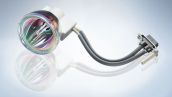
The FSX100 is equipped with three high-quality fluorescence excitation filters and can be fitted with a fourth if needed. The three supplied filters - ultraviolet (360 - 370 nm), blue (460 - 495 nm) and green (530 - 550 nm), cover the excitation requirements for many standard fluorescence dyes, such as DAPI, FITC, TRITC and GFP. The metal halide fluorescence light source provides steady, pre-centered illumination and has a lifetime of 2,000 hours. A fly eye lens is used to ensure even illumination across the field of view and an ND filter is added to control the amount of excitatory light to avoid photo-bleaching of the specimen. Additionally, the field stop is automatically synchronized to the optical zoom to illuminate the part of the sample in the field of view.
Brilliant Brightfield
For phase-contrast and brightfield imaging, the FSX100 is fitted with an LED white light source, providing exceptional illumination stability and color consistency throughout its 16,000 hours lifetime. LEDs also provide color consistency throughout the intensity range, meaning brightness can be controlled without worrying about changes in color.
Fantastic Phase
The system uses a projection phase-contrast setup, where the phase ring is introduced at the level of the filter turret, rather than being positioned permanently in the objective. As a result, there is no requirement for a dedicated phase-contrast objective and the phase ring is only placed in the light path when needed. This also ensures that fluorescence signals are not impeded during fluorescence imaging, making it ideal for specimens with weak signals.
Optically Advanced
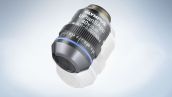
Olympus’ UIS2 optics provides the best possible transmission of fluorescence and brightfield illumination, with minimal spherical and chromatic aberrations. The 40x SAPO objective has a very high NA of 0.95 and is fitted with a motorized cover glass correction collar. Due to the high NA of the objective and the superior 0.42x - 2x zoom optics, the FSX100 provides a zoom range of 4.2x - 80x without any “empty magnification”, ensuring that resolution increases with magnification.
Capturing it All
A high-performance CCD camera is used for both fluorescence and brightfield imaging, offering excellent monochrome sensitivity and color reproduction with a maximum resolution of 12.5 megapixels. Camera control is fully integrated into the software, ensuring optimization of image capture.
Simple to Use - Set, Select, Capture
The FSX100 introduces a higher level of ease-of-use to microscopy than ever before. Complex processes of traditional microscopes are eliminated, ensuring that a broader range of users can access advanced imaging techniques.

Set - Sample Loading
When the FSX100 is switched on the user is guided to load the sample onto the stage. Once loaded, imaging mode is selected. The sample is then ready to be imaged.
Select - Regions of Interest
An autofocused auto-exposed overview image is then created. This overview image is also then available for rapid navigation around the sample in all subsequent steps. Users can select up to 30 regions of interest (ROI) and define imaging processes for each region.
Capture - High Quality
Once the ROI is in the imaging frame, imaging can be performed immediately. Fine-tuning of settings such as magnification power, focus, exposure, imaging mode, and navigation around the sample is controlled from the software. Upon imaging, associated metadata is also recorded, ensuring repeatability of the imaging technique.
Advanced Imaging with User-centric Design
Combining high-quality optics with user-centric software, the Olympus FSX100 is an all-in-one fluorescence imaging system that allows users of any experience to use advanced microscopy techniques to take outstanding images.
Intuitive Control
On zooming into a region of interest, the FSX100 maintains the perfect image, ensuring that the user can remain fixed on the experiment rather than the operation of the instrument. With the ROI displayed in the main view window, important features such as the shutter, focus, exposure, cover glass thickness, magnification and color channel can be focused.
Real-time Image Quality
A real-time image quality filter enables users to apply three levels of noise reduction as well as edge sharpness enhancement algorithms to samples. An automatic black balance correction facility can also be applied to ensure smooth background across the sample (more experienced users can take manual control of this balancing).
Quick Navigation
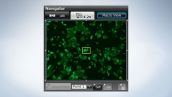
A small overview image is shown which enables quick navigation to a new ROI. The main viewing window can be toggled to show individual channels or overlay for clear analysis of multicolor fluorescence samples. The display window can also be changed to show all channels separately and simultaneously.
On Stage
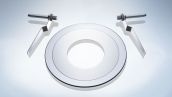
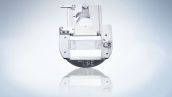
The FSX100 supports a number of different specimen formats such as standard glass slides and glass and plastic culture dishes. Additionally, the stage is completely contained within the enclosure, ensuring that once the sample is loaded, it is essentially held within a darkroom, making fluorescence imaging much more efficient. Furthermore, the precision of the stage ensures that up to 30 separate points can be bookmarked for readout during image capture. The stage also enables the system to stitch together 3 x 3 and 5 x 5 image montages at 20x to 60x magnifications.
Helpful Guidance
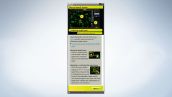
The built-in user assistance resource provides additional guidance for inexperienced users, guiding them through the process step by step.
Data Analysis and Storage
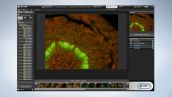
Various filters are available for post-acquisition processing to improve or emphasize key features. Additionally, separate overlays of graphics and text can be included to highlight important points without altering the original image. Basic measurements such as line, area, and brightness can also be performed and exported into Excel.
The FSX100 is equipped with a robust file management library system, ensuring images are easy to find and can be viewed in a number of different formats. Files can also be tagged with user-defined flags to enable grouping and quick sorting. Additionally, acquisition settings can be saved and applied to a new image at the touch of a button.
Specifications
Microscope frame
| Observation Method > Fluorescence (Blue/Green Excitation) | ✓ | |
|---|---|---|
| Observation Method > Fluorescence (Ultraviolet Excitation) | ✓ | |
| Observation Method > Phase Contrast | ✓ | |
| Observation Method > Brightfield | ✓ | |
| Focus > Motorized |
| |
| Condenser > Motorized > Universal Condenser | NA 0.55/ W.D. 27 mm, with Phase contrast slit(Built-in) | |
| Dimensions (W × D × H) | 388 (W) x 583 (D) x 476 (H) mm | |
| Weight | 35 kg |
Software
| Acquisition mode | Single, Time Lapse, Z-stack, and Stitching (fluorescence multicolor imaging possible for all) |
|---|---|
| Bookmarks | Up to 30 positions can be selected and recalled |
| Exposure control | Auto (with exposure adjustment ), Manual |
| Real-time image processing | Noise reduction (3 adjustment levels) , Sharpness (2 adjustment levels) |
| Image overlay | Direct overlay function (live image) |
| White balance, Black balance | Pre-set/Manual, Acquisition/Manual |
| Image format | BMP, JPG, TIFF, AVI |
| Specimen Protection | Automatically shuts OFF excitation light when the system is left without any operation for a certain period of time Field Stop automatically set to field of view |
| Auto image library | Automatically creates a new folder with every specimen change |
| Operation tutorial | Context-sensitive operation guidance display function, user switchable ON/OFF |
| Settings restore function | Multi-user settings storage/reproduction, imaging conditions recording/reproduction functions |
| Image playback |
Display switching (Photo View, Scale-Down View, Thumbnail List, Detailed View)
Time-lapse / Z-stack dedicated viewer Categorization function with the color tag |
| Image editing |
4 segmented display dedicated to multicolor fluorescence image, full screen display, print, adding figures and text, scale display,
date and time display, image rotation, image trimming, image size change, image processing filters, RGB color adjustment (16 bits, 8 bits), gray scale conversion, overlay compensation, level adjustment, measurement (possible to export to Excel) |
| OS | Windows Vista Business SP1 (32 bit) Windows 7 Professional SP1 (32bit) |
Camera
| Type | Single-panel color CCD pixel shift type |
|---|---|
| Imaging sensor | 2/3 size (inch), 1.45 megapixels (Total number of pixels: 1.5 megapixels), Peltier cooling (Max: Tamb - 10°C) |
| Effective image resolution |
4080 × 3072 (12.5 megapixels), 2040 × 1536 (3.1 megapixels), 1360 × 1024 (1.4 megapixels), 680 × 512 (350,000 pixels),
2 × 2 binning; 680 × 510 (350,000 pixels), 4 × 4 binning; 340 × 250 (85,000 pixels) |
| Sensitivity | Equivalent to ISO 200/400/800/1600 |
| A/D converter | 12-bit per channel |
| Display frame rate | Max. 15 frames/sec. (at live image size of 1360 × 1024) |
| Interface | IEEE 1394 cable, Proprietary camera cable |
Applications
Fluorescence / Mouse hippocampal primary neuron (P0) Loading gallery... Loading... 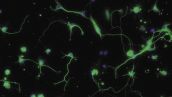 | Fluorescence / Human periodontal ligament fibroblasts (cultured on honeycomb-patterned film) Loading gallery... Loading... 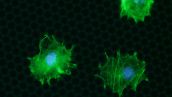 | Fluorescence / Kidney glomerulus. Loading gallery... Loading... 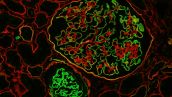 |
Brightfield / Kidney glomerulus. Loading gallery... Loading... 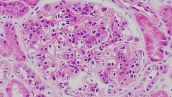 | Brightfield / Primary papillary cancer cells from thyroid gland aspiration Loading gallery... Loading... 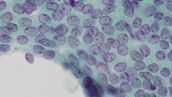 |